Interface Overview
After signing in, users gain access to the ICDC Artifactory interface, where they can view all data available to their account.
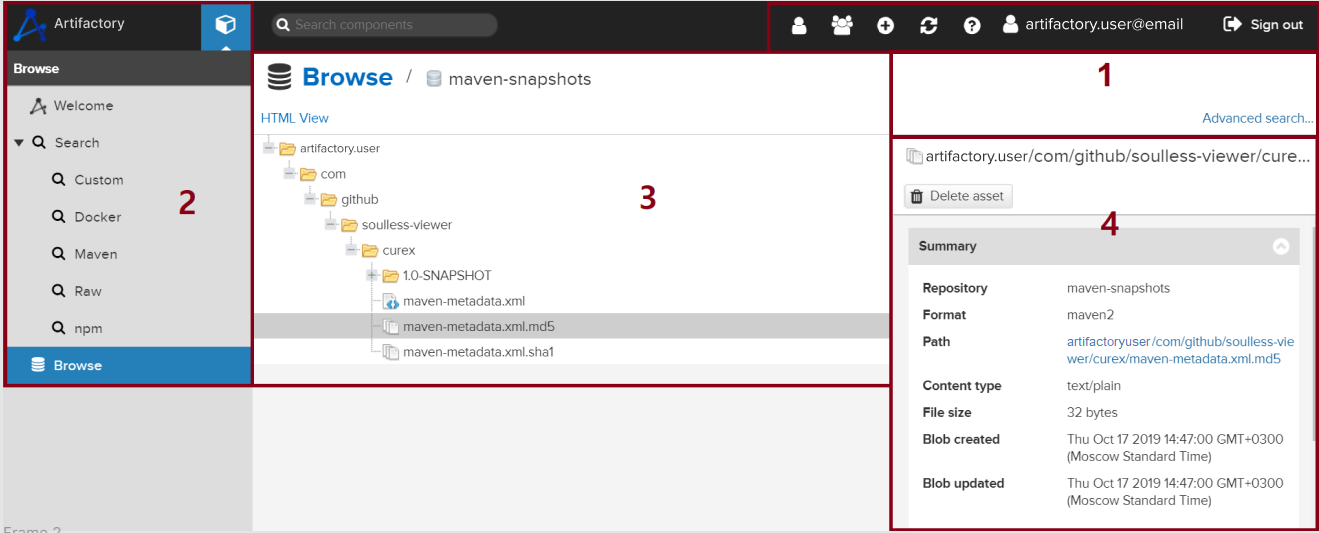
The image below shows the service layout with the repository tree expanded and the selected item details panel open:
-
Control Panel- buttons for managing the team, the service, and the user profile. -
Navigation Panel- search for artifacts using specified criteria (Search) or browse the repository tree (Browse).For more details, see Viewing Components.
-
Repository Tree- a hierarchical catalog structure used to locate items inBrowsemode. When usingSearch, information about the selected item is displayed here. -
Artifact Information- detailed information about the selected item, including format, author, creation date, and other parameters. The displayed data may vary depending on the artifact type.
UID-Based Access to Objects in Repositories
In each Artifactory repository, users can access only those objects whose names begin with the user's UID - the part of the email address before the @ symbol.
For more details, see Repositories.