Invoices
The Invoicing functionality is intended for generating and managing invoices issued to the operator’s customers for consumed resources and provided services.
The Invoices tab is used to view and edit invoices that are automatically generated on a monthly basis based on actual resource usage data.
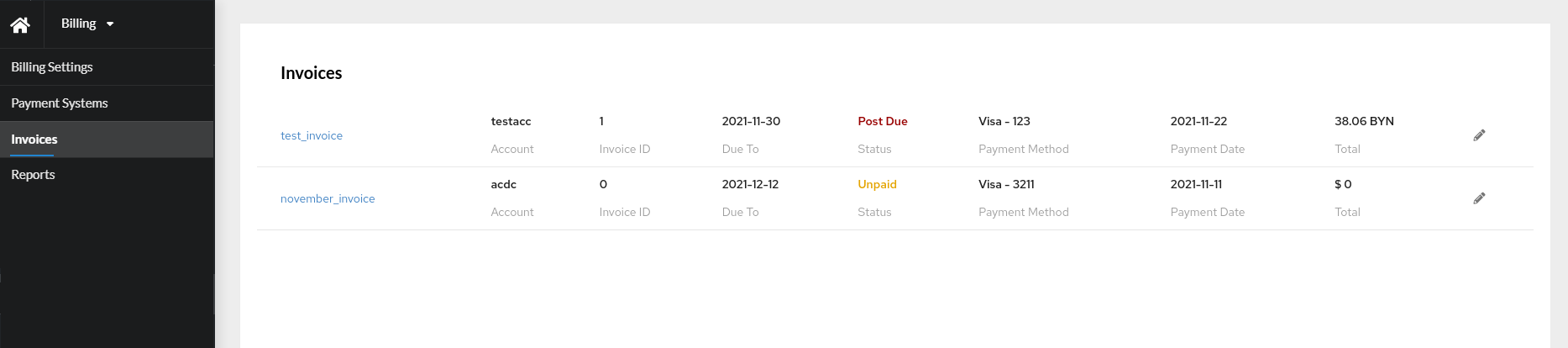
This tab displays a list of invoices for all customers of the operator within the current location region. Invoice data is updated every hour. An automatic status transition mechanism is implemented based on payment status and due dates.
The following invoice statuses are supported:
| Status | Description |
|---|---|
Draft |
The invoice has been generated but has not been moved to another status. It is automatically transitioned to Unpaid on the second day of the month following the reporting period. |
Unpaid |
No payment confirmation has been received for the invoice. This status is assigned automatically on the second day of the month following the reporting period if no payment has been received. |
Paid |
The invoice has been paid. This status is assigned automatically once payment receipt is confirmed. |
Post due |
The invoice due date has passed and no payment confirmation has been received. In this case, the Unpaid status is automatically changed to Overdue. |
By clicking the invoice name, the invoice can be viewed in PDF format in a new window.
Invoice editing
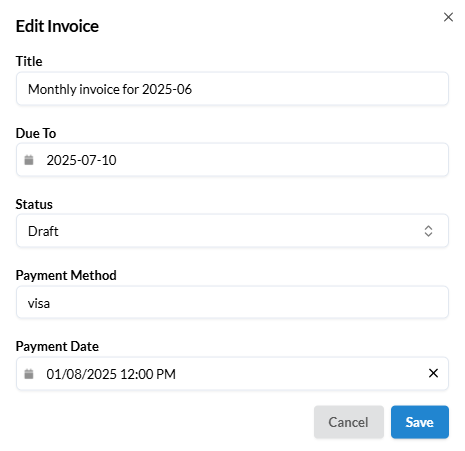
- Click the
Editbutton in the corresponding invoice. - In the modal window, fill in the following fields:
Title,Due Todate,Status,Payment MethodandPayment date. - Click
Save.
Status changes
Manual status changes are supported for invoices.