File Versioning
ICDC Disk automatically saves versions of every file stored in the service. File versions act as backups and can be used to restore data.
The frequency of version creation depends on the time elapsed since the last modification:
- The first version is saved one second after the file is modified;
- Within the first 10 seconds - one version every 2 seconds;
- Within the first minute - one version every 10 seconds;
- Within the first hour - one version every minute;
- Within the first 24 hours - one version every hour;
- Within the first 30 days - one version every day;
- After 30 days - one version every week.
When co-editing a document in Onlyoffice, changes are temporarily stored in the editor server cache and automatically saved to disk every minute, after which the general versioning rule described above applies.
Saving changes
If all users close the tab with the file being edited, the most recent changes will be saved to the disk.
Viewing Versions
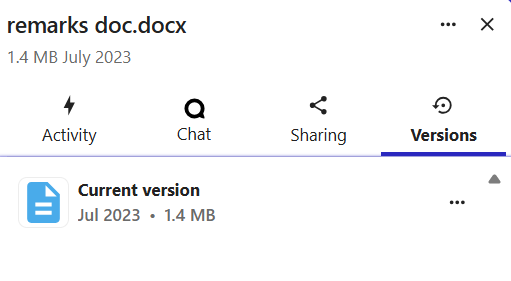
To view the saved versions of a file, open the file context menu, select Open details, and choose the Versions tab in the panel that opens on the right.
The tab displays a list of all saved versions with their creation timestamps. For each version, the following actions are available: viewing the exact date and time of creation, opening the version in a new tab, and restoring the file to the selected state.