Shared Access
ICDC Disk allows you to share files and folders with other users for collaboration.
Providing Shared Access
When granting access to files or folders, a user can assign others permissions to view and edit, or read-only permissions - either on a permanent or temporary basis.
Access can be shared in various ways with flexible permission settings.
For example, the Copy internal link to clipboard button next to Internal link copies a link that is only accessible to users who already have access to the file or folder.
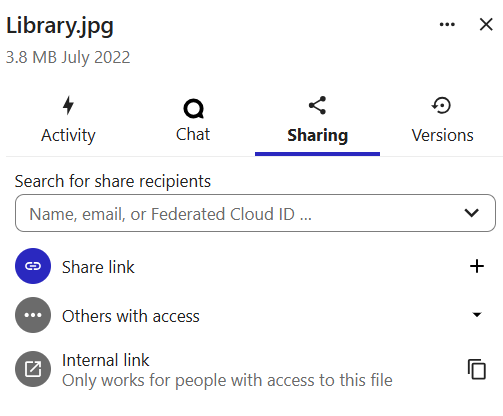
If you need to share a file or folder with a user who does not yet have access, you can create an access link by clicking Copy public link to clipboard link to the right of Share link. Using the additional actions menu, you can fine-tune access permissions and create additional links (Custom permissions).
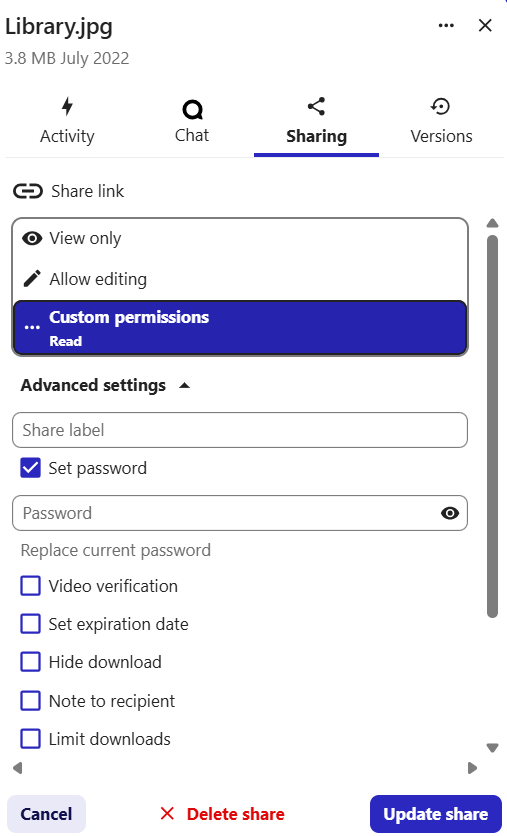
Read and write permissions can be granted both to individual users and to groups of users.
To create a group, the account administrator needs to contact technical support. Access permissions can only be configured for the entire group as a whole.
To find a user, enter at least the first three characters of their name or email address.
Disk space usage
When sharing access, the recipient’s disk space usage does not change. Creating new files in a shared folder uses the disk space of the user who granted access.
Deleting a user
If the owner of a file or folder is removed from the system, the corresponding files and folders will also be deleted. To avoid this, it is recommended to create a project user and a separate folder for storing shared files - in this case, materials of employees who have left will remain available to the team.
Shared Access for Departments
Each ICDC Disk user belongs to a hierarchy of departments based on their company’s organizational structure and may simultaneously be a member of multiple user groups.
Access to files and folders can be granted both to individual users and to entire departments.
Department name changes
In case of shared access for an entire department, its users may lose the granted access if the department changes its name.
Project Accounts
Project accounts allow files to be stored and shared for multiple users but the files will remain intact in case their owner will leave the project or ICDC Disk.
Advantages:
- Project files remain in the system after users leave the team.
- Easy access to the project's files.
Project account
Please contact the Support team to create a project account.